
In this little article, I describe how to use the cmdlet Test-Path to check whether a folder exists. Type "Get-Help Test-Path" for built-in information. I also briefly demonstrate how to use the .NET class method Exists() from the class System.IO.Directory. The Test-Path cmdlet returns a boolean for whether or not the folder exists. True if it exists and False if it does not exist.
PS C:\> Test-Path C:\Windows
True
Remember that you need single or double quotes around the path if it contains a space. Single quotes are recommended, since they don't expand/substitute/interpolate variables.
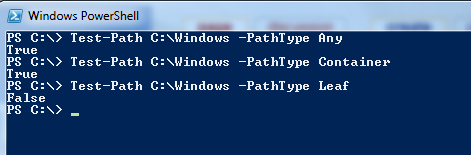
To explicitly make sure it's a directory and not a file, use the -PathType parameter which accepts the following values:
PS C:\> Test-Path C:\Windows -PathType Any
True
PS C:\> Test-Path C:\Windows -PathType Container
True
PS C:\> Test-Path C:\Windows -PathType Leaf
False
Also remember that if the path or folder name contains a space, you need to surround the entire path in quotes. Single quotes or double quotes will work the same if there are no "expandable" parts in the path or folder name, but the slightly safer choice is single quotes. This is what PowerShell defaults to when you auto-complete names with tab at the prompt.
PS C:\> if (Test-Path -Path 'C:\Windows' -PathType Container) {
    "It's a container/folder/directory"
}

It's a container/folder/directory

PS C:\> if ( -not (Test-Path -LiteralPath 'C:\Windows' -PathType Leaf) ) {
    "It's not a leaf/file"
}

It's not a leaf/file
You should also be made aware of the parameter -LiteralPath to Test-Path, that you can see in the second example above. This also works if your file contains characters like brackets that causes the -Path parameter to expand the path since it supports wildcard syntax by default. Use -LiteralPath if you don't need expansion from -Path, as it's the safer choice for oddly named files.
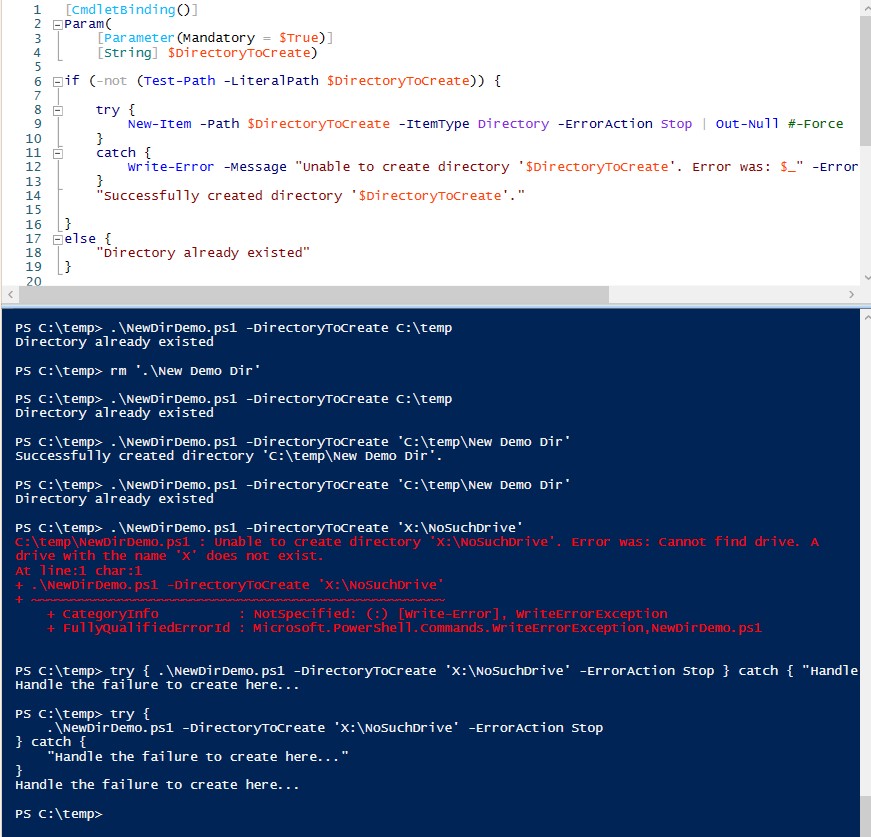
To create a directory if it does not exist, this is a very robust example of how you might want to handle it. Adapt to suit your needs.
This code was put in the file "NewDirDemo.ps1" that you see me using below.
[CmdletBinding()]
Param(
    [Parameter(Mandatory = $True)]
    [String] $DirectoryToCreate)

if (-not (Test-Path -LiteralPath $DirectoryToCreate)) {

    try {
        New-Item -Path $DirectoryToCreate -ItemType Directory -ErrorAction Stop | Out-Null #-Force
    }
    catch {
        Write-Error -Message "Unable to create directory '$DirectoryToCreate'. Error was: $_" -ErrorAction Stop
    }
    "Successfully created directory '$DirectoryToCreate'."

}
else {
    "Directory already existed"
}
Demonstration of use in the following screenshot.
PS C:\> Test-Path C:\Windows -PathType foo
Test-Path : Cannot bind parameter 'PathType'. Cannot convert value "foo" to type
"Microsoft.PowerShell.Commands.TestPathType" due to invalid enumeration values.
Specify one of the following enumeration values and try again.
The possible enumeration values are "Any, Container, Leaf".
At line:1 char:31
+ Test-Path C:\Windows -PathType <<<<  foo
    + CategoryInfo          : InvalidArgument: (:) [Test-Path], ParameterBindingException
    + FullyQualifiedErrorId : CannotConvertArgumentNoMessage,Microsoft.PowerShell.Commands.TestPathCommand
PS E:\temp> [System.IO.Directory]::Exists('E:\temp\')
True
PS E:\temp> [System.IO.Directory]::Exists('E:\temp')
True
If you want to check if the directory the script/program is currently in contains a subdirectory, you can use the trick I demonstrate below - where I check if there's a subdirectory called "Windows".
In PowerShell, the namespace "System" doesn't have to be typed in explicitly, so you can omit it.PS C:\> [IO.Directory]::Exists( (Join-Path (Get-Location) 'Windows') ) TruePowershell Windows All CategoriesPS C:\> cd E:\temp
PS E:\temp> [IO.Directory]::Exists( (Join-Path (Get-Location) 'Windows') ) False
Minimum cookies is the standard setting. This website uses Google Analytics and Google Ads, and these products may set cookies. By continuing to use this website, you accept this.