
When the token expires you get an error message that I built in a check for, which causes the module to retrieve a new token before repeating the translating/language-detecting action that failed.
This hasn't been tested extensively and must be considered beta.You can also check out the source code if you're just looking for a MS Translator API example with PowerShell and/or want to roll your own.
NB! Microsoft has announced the following: "Beginning January 1, 2017, subscribers to the Microsoft Translator Text and Speech APIs will have limited access in Azure DataMarket. We recommend that you move to Azure now to avoid service disruption."At least PowerShell version 3 is required.
The LangTranslate module has the following exported cmdlets/functions:
*LangTranslate.zip - It contains the PowerShell module and manifest in a folder called "LangTranslate".
''2013-11-07: Corrected a bug in the Get-Language cmdlet where I erroneously used HtmlEncode instead of UrlEncode.'''''Tip!''' To use a PowerShell module, check "$env:PSModulePath", create a directory called "Modules" in one of the listed paths, if necessary, and copy the unzipped folder there, then use "Import-Module LangTranslate". With PowerShell version 3 and higher, modules will auto-load when you try to use a cmdlet from one of them. You can also import it from a (relative) path, like this:
PS C:\PowerShell> Import-Module .\MyPSModules\LangTranslate
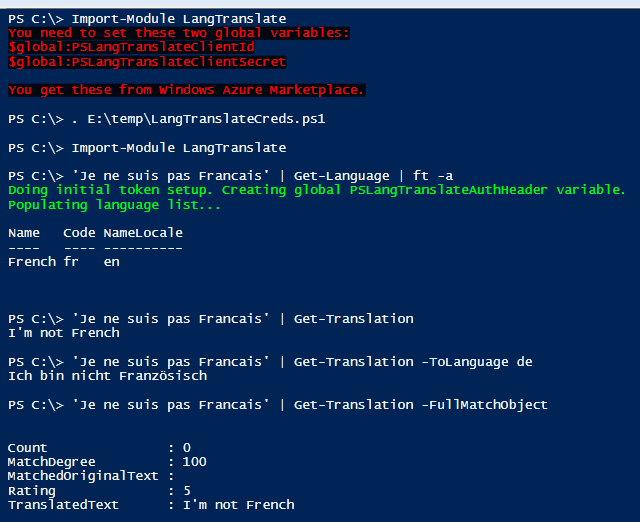
PS C:\> 'Jeg er norsk' | Get-Translation
I am Norwegian
To get more data, such as match degree and rating, use the -FullMatchObject parameter to get the entire TranslationMatch object. The returned object is of the type System.Xml.XmlElement.
PS C:\> 'Jeg er norsk' | Get-Translation -FullMatchObject

Count               : 0
MatchDegree         : 100
MatchedOriginalText :
Rating              : 5
TranslatedText      : I am Norwegian
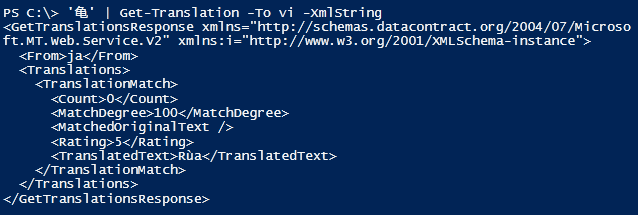
You can also return the full GetTranslationsResponse object by using the -FullObject parameter. This won't be useful displayed directly to the host/console/screen as it is, but it's useful for storing in a variable and then inspecting/using as you see fit. The returned object with -FullObject is of the type System.Xml.XmlDocument.
You can use Get-Language to determine the source language, but you can also retrieve it using the -FullObject parameter to Get-Translation.
PS C:\> 'father', 'mamma' | Get-Translation -FullObject |
    Select -Exp GetTranslationsResponse | Select -Exp From

en
it

PS C:\> 'father', 'mamma' | Get-Translation -FullObject |
    Select -Exp GetTranslationsResponse | Select -Exp From |
    %{ $From = $_; Get-LanguageList | %{ if ($From -eq $_.Code) { $_.Name } } }

English
Italian

PS C:\> ('mamma' | Get-Translation -FullObject | select -Exp GetTranslationsResponse).Translations.TranslationMatch.TranslatedText
MOM
There are quite a few inconsistencies in the translation data. Some translations work surprisingly well, even some special case expressions/sayings, while others fail miserably. In this case "MOM" is returned in all uppercase, for no good reason. I suspect human beings are to blame for most of these inconsistencies. Some data appears to be "trolling"/jokes/stupid.
This demonstrates the -MaxTranslations parameter. The default value is 1. Here I get three results (two with identical "TranslatedText" values).
PS C:\> 'hei' | Get-Translation -MaxTranslations 5 -FullMatchObject


Count               : 0
MatchDegree         : 100
MatchedOriginalText :
Rating              : 5
TranslatedText      : Hi

Count               : 1
MatchDegree         : 100
MatchedOriginalText : hei
Rating              : 1
TranslatedText      : Hi

Count               : 0
MatchDegree         : 100
MatchedOriginalText : hei
Rating              : 0
TranslatedText      : Hello
I should mention that the array will be flattened, and that you will get returned the total number of objects in sequence, without the ability to distinguish them as belonging to the first or second word's set of translation objects.
PS C:\> $Trans = 'hei', 'hej' | Get-Translation -MaxTranslations 5 -FullMatchObject
PS C:\> $Trans.Count
8
To work around this, you could do something like this to get an array of arrays (notice the unary comma operator).
PS C:\> $Trans = 'hei', 'hej' |
    %{ , @(Get-Translation -MaxTranslations 5 -FullMatchObject -Text $_) }
PS C:\> $Trans.Count
2
PS C:\> $Trans[0].Count, $Trans[1].Count
3
5
PS C:\> $Trans[0] | Select -Exp TranslatedText
Hi
Hi
Hello
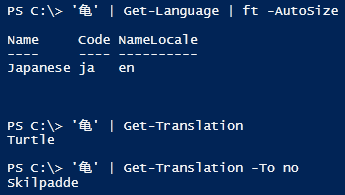
PS C:\> 'jeg er norsk' | Get-Language | Format-List

Name       : Norwegian
Code       : no
NameLocale : en
And to display the language name in Spanish, I use Get-LanguageList with the -CustomLocale parameter:
PS C:\> Get-LanguageList -CustomLocale es | Out-Null Populating language list...PS C:\> 'jag är svensk' | Get-Language | fl
Name : Sueco Code : sv NameLocale : es PS C:\> 'sueco' | Get-Translation Swedish
Unless you change the current locale with -CustomLocale, or change from a custom locale back to English (possibly by not supplying a parameter at all), the results are cached and repeated Get-LanguageList calls won't trigger more API calls.
'''NB! The language that's last set with Get-LanguageList is also the one used by Get-Language.'''PS C:\> Get-LanguageList | Format-Table -AutoSize Populating language list... Name Code NameLocale ---- ---- ---------- Arabic ar en Bulgarian bg en Catalan ca en Czech cs en Danish da en German de en Greek el en English en en Spanish es en Estonian et en Persian fa en Finnish fi en French fr en Hebrew he en Hindi hi en Haitian Creole ht en Hungarian hu en Indonesian id en Italian it en Japanese ja en Korean ko en Lithuanian lt en Latvian lv en Hmong Daw mww en Dutch nl en Norwegian no en Polish pl en Portuguese pt en Romanian ro en Russian ru en Slovak sk en Slovenian sl en Swedish sv en Thai th en Turkish tr en Ukrainian uk en Vietnamese vi en Chinese Simplified zh-CHS en Chinese Traditional zh-CHT en
To get the names in a different language (changing the "NameLocale" value), use the -CustomLocale parameter.
PS C:\> Get-LanguageList -CustomLocale fr | Out-Null Populating language list...PS C:\> Get-LanguageList -CustomLocale fr | Select -First 5 | ft -Auto
Name Code NameLocale ---- ---- ---------- Arabe ar fr Bulgare bg fr Catalan ca fr Tchèque cs fr Danois da fr PS C:\> 'juxtaposition' | Get-Language | Select -Exp Name Anglais PS C:\> Get-LanguageList | Out-Null # sets it to English Populating language list... PS C:\> 'juxtaposition' | Get-Language | Select -Exp Name English PS C:\> 'canard' | Get-Language | Select -Exp Name French
PS C:\> Get-LanguageTokenCount
4
# Author: Joakim Svendsen. Svendsen Tech.
# Copyright (2013). All rights reserved.

#Set-StrictMode -Version Latest
$ErrorActionPreference = 'Stop'

# Tries to get a new token.
function Get-MSTranslateToken {

    #Add-Type -AssemblyName System.Web # added to manifest file

    $script:TokenCount++

    $Request = "grant_type=client_credentials&client_id={0}&client_secret={1}&scope=http://api.microsofttranslator.com" -f `
        ($PSLangTranslateClientId, $PSLangTranslateClientSecret | %{ [Web.HttpUtility]::UrlEncode($_) } )
    $DatamarketAccessUri = "https://datamarket.accesscontrol.windows.net/v2/OAuth2-13"

    $WebRequest = $null

    $WebRequest = [Net.WebRequest]::Create($DatamarketAccessUri)
    $WebRequest.ContentType = "application/x-www-form-urlencoded"
    $WebRequest.Method = "POST";
    [byte[]] $Bytes = [Text.Encoding]::ASCII.GetBytes($Request);
    $WebRequest.ContentLength = $Bytes.Length;
    $OutputStream = $WebRequest.GetRequestStream()
    $OutputStream.Write($Bytes, 0, $Bytes.Length)
    $WebResponse = $WebRequest.GetResponse()

    $RespStream = $WebResponse.GetResponseStream()

    $StreamReader = $null
    $StreamReader = New-Object System.IO.StreamReader $RespStream, ([Text.Encoding]::ASCII)
    $Response = $StreamReader.ReadToEnd()

    $global:PSLangTranslateAuthHeader = "Bearer " + (ConvertFrom-Json $Response).access_token

}

<#
.SYNOPSIS
The Get-LanguageTokenCount cmdlet returns the number of times an attempt has
been made to retrieve a new Windows Azure Marketplace token.

The token expires after a while and will automatically be renewed by the LangTranslate module.

.EXAMPLE
PS C:\> Get-LanguageTokenCount
3
#>

function Get-LanguageTokenCount {

    $script:TokenCount

}

function New-LanguageList {

    param([string] $Locale = 'en',
          [string] $CustomLocale
    )

    # If a custom locale is passed in (from Get-LanguageList at the time of writing this)
    if ($CustomLocale) { $Locale = $CustomLocale }

    try {
        $TempLangCodes = Invoke-RestMethod -Method Get -Uri 'http://api.microsofttranslator.com/V2/Http.svc/GetLanguagesForTranslate' `
            -Headers @{ Authorization = $PSLangTranslateAuthHeader }
    }
    catch {
        if ($_ -like '*Message: The incoming token has expired.*') {
            ## DEBUG
            #Write-Host -Fore Yellow "Token has expired; getting a new one."

            Get-MSTranslateToken
            if ($CustomLocale) { New-LanguageList -CustomLocale $CustomLocale }
            else { New-LanguageList }
            return
        }
        else {
            New-Object PSObject -Property @{ 'Error' = $_.ToString() }
            return
        }
    }

    ### DEBUG
    #$TempLangCodes
    #$TempLangCodes.GetType().FullName

    [string[]] $LangCodes = $TempLangCodes.ArrayOfstring | Select -ExpandProperty string | Sort

    # Get language names - the hard way
    #Add-Type -AssemblyName System.Runtime.Serialization # added to manifest
    $Dcs = $null
    $WebRequest = $null

    $Dcs = New-Object System.Runtime.Serialization.DataContractSerializer ([Type]::GetType("System.String[]"))
    $WebRequest = [Net.WebRequest]::Create("http://api.microsofttranslator.com/v2/Http.svc/GetLanguageNames?locale=$Locale")
    $WebRequest.Headers.Add('Authorization', $PSLangTranslateAuthHeader)
    $WebRequest.ContentType = "text/xml"
    $WebRequest.Method = "POST";
    $OutputStream = $WebRequest.GetRequestStream()
    $Dcs.WriteObject($OutputStream, $LangCodes)
    $Response = $WebRequest.GetResponse()
    $ResponseStream = $Response.GetResponseStream()

    $LanguageNames = $Dcs.ReadObject($ResponseStream)
    $GetOut = $true

    $script:Languages = @{}
    for ($i = 0; $i -lt $LangCodes.Count; $i++) {
        $script:Languages.($LangCodes[$i]) = New-Object PSObject -Property @{ 'Name' = $LanguageNames[$i]; 'NameLocale' = $Locale }
    }

}

function New-LangTranslateEnv {

    param([string] $CustomLocale = 'en',
          [switch] $UpdateLangList)

    if (-not ((Get-Variable -Scope Global -Name PSLangTranslateClientId -ErrorAction SilentlyContinue) `
        -or (Get-Variable -Scope Global -Name PSLangTranslateClientSecret -ErrorAction SilentlyContinue))) {

        Write-Host -ForegroundColor Red -BackgroundColor Black "You need to set these two global variables:`n`$global:PSLangTranslateClientId`n`$global:PSLangTranslateClientSecret`n`nYou get these from Windows Azure Marketplace."
        return

    }

    if (-not (Get-Variable -Scope Global -Name PSLangTranslateAuthHeader -ErrorAction SilentlyContinue)) {
        Write-Host -ForegroundColor Green 'Doing initial token setup. Creating global PSLangTranslateAuthHeader variable.'
        Get-MSTranslateToken
    }

    if ((-not (Get-Variable -Scope Script -Name Languages -ErrorAction SilentlyContinue)) -or $UpdateLangList) {
        Write-Host -ForegroundColor Green 'Populating language list...'
        New-LanguageList -CustomLocale $CustomLocale
    }

}

<#
.SYNOPSIS
The Get-LanguageList cmdlet lists the languages supported by the Microsoft Translator API.
The returned objects have three properties: Name, Code and NameLocale.

Name: The name of the language in the language specified in NameLocale.
Code: The ISO 639-1 language code for the language.
NameLocale: The language to retrieve language names in. You can specify this with the
-CustomLocale parameter to Get-LanguageList. The default is English.

The language set with Get-LanguageList (default still English), in the property "NameLocale"
determines which language is used by the cmdlet Get-Language when it returns a language name
or "unknown" attempted translated to the specified language.

.PARAMETER CustomLocale
Optional. Default English ("en"). The ISO 639-1 language code for the language to retrieve
language names in. For instance "de" returns language names in German.

.EXAMPLE
Get-LanguageList | Select -First 5

Name                                    Code                                    NameLocale
----                                    ----                                    ----------
Arabic                                  ar                                      en
Bulgarian                               bg                                      en
Catalan                                 ca                                      en
Czech                                   cs                                      en
Danish                                  da                                      en

.EXAMPLE
Get-LanguageList -CustomLocale de | Select -First 5
Populating language list...

Name                                    Code                                    NameLocale
----                                    ----                                    ----------
Arabisch                                ar                                      de
Bulgarisch                              bg                                      de
Katalanisch                             ca                                      de
Tschechisch                             cs                                      de
Dänisch                                 da                                      de
#>

function Get-LanguageList {

    param([string] $CustomLocale = 'en')

    # Check if the current locale used for the names of languages is different from the one passed in via
    # the CustomLocale parameter (default is English), and add -UpdateLangList if it indeed is different.
    if ($script:Languages.'en'.NameLocale -ine $CustomLocale) {
        New-LangTranslateEnv -CustomLocale $CustomLocale -UpdateLangList
    }
    # First time population, or don't populate at all since it's already populated and in the requested locale.
    else {
        New-LangTranslateEnv -CustomLocale $CustomLocale
    }

    $script:Languages.GetEnumerator() | Sort Name | ForEach-Object {
        New-Object PSObject -Property @{
            'Name' = $_.Value.Name
            'Code' = $_.Name
            'NameLocale' = $_.Value.NameLocale
        } | Select Name, Code, NameLocale
    } # end of foreach-object

}

<#
.SYNOPSIS
The Get-Translation cmdlet uses the Microsoft Translator API v2 to translate text.

.DESCRIPTION
The default behavior is to translate text using auto-detection (using the Get-Language
cmdlet) for the source language, and translating it into English. Use the -ToLanguage
parameter to translate into a different language.

You can specify the from language in case the auto-detection doesn't work or simply
if you know the source language.

By default, the cmdlet returns strings, and errors will start with "Error: " followed
by the error text.

If you use the -FullMatchObject parameter, you will get the full
TranslationMatch object, and errors will be in an 'Error' property that exists on objects
with information about translations/detections that failed. This error property does not
exist on successful translation objects. This object is of the type System.Xml.XmlElement.

If you use the -FullObject parameter, you will get the complete GetTranslationsResponse
object which is of the type System.Xml.XmlDocument.

.PARAMETER Text
The text to translate.
.PARAMETER FromLanguage
Optional. Default is to auto-detect. The language the text to translate is in.
.PARAMETER ToLanguage
Optional. Default is English. The ISO 639-1 language code for the language
to translate the text to.
.PARAMETER MaxTranslations
Optional. Default: 1. The maximum number of returned translations for the text.
.PARAMETER FullObject
Optional. Return the full GetTranslationsResponse XML document object.
.PARAMETER FullMatchObject
Optional. Return the full TranslationMatch object for the translation.
.PARAMETER XmlString
Optional. Return the full GetTranslationsResponse XML document object as a
well-formatted XML string.

.EXAMPLE
'I am using a translation module' | Get-Translation -ToLanguage de
Ich verwende ein Übersetzung-Modul

.EXAMPLE
'Ich verwende ein Übersetzung-Modul' | Get-Translation -FullMatchObject

Count               : 0
MatchDegree         : 100
MatchedOriginalText :
Rating              : 5
TranslatedText      : I use a translation engine

.EXAMPLE
'Ich verwende ein Übersetzung-Modul' | Get-Translation -FromLanguage de -ToLanguage es -XmlString

http://schemas.datacontract.org/2004/07/Microsoft.MT.Web.Service.V2"
xmlns:i="">http://www.w3.org/2001/XMLSchema-instance">
  de


      0
      100

      5
      Utilizo un motor de traducción


.EXAMPLE
'chicken', 'pork', 'foobarboo', 'beef', 'duck' | Get-Translation -ToLanguage fr
poulet
porc
foobarboo
boeuf
canard

Sometimes when it can't find a translation, it returns the same text as it was, so beware of that.

.EXAMPLE
'å forstå' | Get-Translation

# If it's unable to detect the source language, you will get an error like this:

Error: Argument Exception
Method: GetTranslations()
Parameter: from
Message: 'from' must be a valid language Parameter name: from
message id=3631.V2_Rest.GetTranslations.247CDBA3

# If you use the -FullObject or -FullObjectMatch parameter, you will get a custom
# PowerShell object with an "Error" property returned.

PS C:\> 'å forstå' | Get-Translation -FullMatchObject | fl

Error : Argument Exception
        Method: GetTranslations()
        Parameter: from
        Message: 'from' must be a valid language Parameter name: from
        message id=1601.V2_Rest.GetTranslations.248A71F0
#>
function Get-Translation {

    [CmdLetBinding()]
    param([Parameter(Mandatory=$true,ValueFromPipeLine=$true)][string[]] $Text,
          [string] $FromLanguage = 'auto',
          [string] $ToLanguage = 'en',
          [int] $MaxTranslations = 1,
          [switch] $FullObject,
          [switch] $FullMatchObject,
          [switch] $XmlString
    )

    begin {
        New-LangTranslateEnv
    }

    process {

        foreach ($IterText in $Text) {

            #Start-Sleep -Milliseconds 500

            $TempFromLanguage = $FromLanguage

            if ($FromLanguage -ieq 'auto') {
                if ($LangCode = ($IterText | Get-Language | Select -EA SilentlyContinue -Exp Code)) {
                    $TempFromLanguage = $LangCode
                }
                else {
                    # Return an object with an error property if they wanted objects.
                    if ($FullObject -or $FullMatchObject) {
                        New-Object PSObject -Property @{ 'Error' = "Unable to automatically determine 'From' language." }
                        continue
                    }
                    # Otherwise, we're dealing with strings, and return a string. Seems like a strategy as good as any
                    # I could think of right now.
                    else {
                        "Error: Unable to automatically determine 'From' language"
                        continue
                    }
                }
            }

            try {

                $Translation = Invoke-RestMethod -Method Post -Headers @{'Authorization' = $global:PSLangTranslateAuthHeader} `
                    -Uri ('http://api.microsofttranslator.com/V2/Http.svc/GetTranslations?text={0}&from={1}&to={2}&maxTranslations={3}' -f `
                        ($IterText, $TempFromLanguage, $ToLanguage, $MaxTranslations | %{ [Web.HttpUtility]::UrlEncode($_) } ))

                # Pass error objects or translation match objects (possibly only the "TranslatedText" property) down the pipeline.
                # Handle errors.
                if (-not ($FullObject -or $FullMatchObject) -and `
                    ($Translation.GetTranslationsResponse.Translations.TranslationMatch | Get-Member -Name Error)) {

                    $Translation.GetTranslationsResponse.Translations.TranslationMatch | Select -Expand Error | %{ 'Error: ' + $_ }
                    continue
                }
                # Pass result objects.
                if ($FullObject) {
                    $Translation
                    continue
                }
                if ($XmlString) {
                    Format-Xml -InputObject $Translation
                    continue
                }
                if ($FullMatchObject) {
                    $Translation.GetTranslationsResponse.Translations.TranslationMatch
                    continue
                }
                else {
                    $Translation.GetTranslationsResponse.Translations.TranslationMatch | Select -Expand TranslatedText
                    continue
                }

            }

            catch {

                if ($_ -like '*Message: The incoming token has expired.*') {
                    #Write-Host -ForegroundColor Yellow "Token has expired; getting a new one."
                    Get-MSTranslateToken
                    if ($FullObject) {
                        Get-Translation -Text $IterText -FromLanguage $FromLanguage -ToLanguage $ToLanguage -MaxTranslations $MaxTranslations -FullObject
                    }
                    elseif ($XmlString) {
                        Get-Translation -Text $IterText -FromLanguage $FromLanguage -ToLanguage $ToLanguage -MaxTranslations $MaxTranslations -XmlString
                    }
                    elseif ($FullMatchObject) {
                        Get-Translation -Text $IterText -FromLanguage $FromLanguage -ToLanguage $ToLanguage -MaxTranslations $MaxTranslations -FullMatchObject
                    }
                    else {
                        Get-Translation -Text $IterText -FromLanguage $FromLanguage -ToLanguage $ToLanguage -MaxTranslations $MaxTranslations
                    }
                }
                else {
                    if ($FullObject -or $FullMatchObject) {
                        New-Object PSObject -Property @{ 'Error' = $_.ToString() }
                        #continue
                    }
                    else {
                        "Error: $_"
                        #continue
                    }
                }

            } # end of catch

        } # end of foreach $Text

    } # end of process block

} # end of Get-Translation function

<#
.SYNOPSIS
Get-Language will try to detect the source language of the provided text.

You can pipe values for the -Text parameter to the cmdlet.

It accepts only one parameter, which is the text.

.DESCRIPTION
The cmdlet will return an object with three properties, unless there's
a terminating error, in which case the only property will be "Error"
and its value will be the error message.

For non-terminating errors, and successful detection, you will get
returned an object with three properties: Name, Code, NameLocale.

"Name" is the name of the detected language - represented as a string in the
language indicated by the language code in the "NameLocale" property that's
determined by Get-LanguageList. By default this is English unless you've used
the -CustomLocale parameter for Get-LanguageList prior to running Get-Language.

If it can't determine the source language, the "Name" and "Code" values
will be "Unknown", attempted translated to the language in "NameLocale", which,
as previously mentioned, is English unless you've used Get-LanguageList -CustomLocale.
If the language is English, a translation won't be made and the text will
literally be "Unknown".

"Code" is the ISO 639-1 language code for the language.

.PARAMETER Text
The text to detect the source language for.

.EXAMPLE
'jeg er norsk' | Get-Language | ft -a

Name      Code NameLocale
----      ---- ----------
Norwegian no   en

.EXAMPLE
'å forstå' | Get-Language | ft -a

Name    Code    NameLocale
----    ----    ----------
Unknown Unknown en

.EXAMPLE
Get-LanguageList -CustomLocale fr | Out-Null
Populating language list...
PS C:\> 'jeg er norsk' | Get-Language | ft -a

Name      Code NameLocale
----      ---- ----------
Norvégien no   fr


PS C:\> 'å forstå' | Get-Language | ft -a

Name    Code    NameLocale
----    ----    ----------
Inconnu Inconnu fr
#>

function Get-Language {

    [CmdLetBinding()]
    param([Parameter(Mandatory=$true,ValueFromPipeLine=$true)][string[]] $Text)

    begin {
        New-LangTranslateEnv
    }

    process {

        foreach ($IterText in $Text) {

            try {
                $Language = Invoke-RestMethod -Method Get -Headers @{'Authorization' = $global:PSLangTranslateAuthHeader } `
                    -Uri ('http://api.microsofttranslator.com/V2/Http.svc/Detect?text=' + [Web.HttpUtility]::UrlEncode($IterText))

                # Send the results down the pipeline in a custom PS object.
                if ($LangCode = $Language.string.'#text') {
                    New-Object PSObject -Property @{
                        'Name' = $Languages.$LangCode.Name
                        'Code' = $LangCode
                        'NameLocale' = $Languages.$LangCode.NameLocale
                    } | Select Name, Code, NameLocale
                }
                # Couldn't detect source language. Populate object with current "custom locale" language's word for "unknown"...
                else {
                    New-Object PSObject -Property @{
                        'Name' = if ($Languages.'en'.NameLocale -ieq 'en') { 'Unknown' } else { $TempUnknown = Get-Translation -Text 'Unknown' -FromLanguage en -ToLanguage $Languages.'en'.NameLocale; $TempUnknown }
                        'Code' = if ($Languages.'en'.NameLocale -ieq 'en') { 'Unknown' } else { $TempUnknown }
                        'NameLocale' = $Languages.'en'.NameLocale
                    } | Select Name, Code, NameLocale
                }
            }

            catch {

                if ($_ -iLike '*Message: The incoming token has expired.*') {
                    #Write-Host -ForegroundColor Yellow "Token has expired; getting a new one."
                    Get-MSTranslateToken
                    Get-Language -Text $Text
                }
                else {
                    New-Object PSObject -Property @{ 'Error' = $_.ToString() }
                    continue
                }

            }

        } # end of foreach

    } # end of process block

} # end of Get-Language function/cmdlet


#$global:PSLangTranslateClientId = ''
#$global:PSLangTranslateClientSecret = ''

[int] $script:TokenCount = 0
New-LangTranslateEnv

Export-ModuleMember -Function Get-Translation, Get-Language, Get-LanguageList, Get-LanguageTokenCount
Powershell
Windows
All Categories
Minimum cookies is the standard setting. This website uses Google Analytics and Google Ads, and these products may set cookies. By continuing to use this website, you accept this.